Closing Trades
How OptionsPro pairs closing executions with their openers, and how to record a close on a manual position.
OptionsPro doesn't have a separate "close a trade" record type. Each trade is stored independently as BTO, STO, BTC, or STC, and a position's open quantity and realized P&L are computed from those trades on the fly.
How closes are matched
For every contract (underlying | expiration | optionType | strike) we walk
the trades in date order and match closes against openers using FIFO:
- STC consumes from the queue of unmatched BTO lots.
- BTC consumes from the queue of unmatched STO lots.
- Realized P&L for a long match is
(close − open) × qty × 100 − fees. For a short match the sign flips:(open − close) × qty × 100 − fees.
Fees on both the opener and the closer (including any fee overrides) are pulled into the realized P&L of the matched lot.
For connected brokerages, no action is needed - incoming BTC/STC fills are recorded on sync and the matching happens automatically the next time the position is read.
Closing a manual position
For manually-entered open legs, open the Trades page and click Add Closing Event in the header, or pick Close Position from a row's action menu:
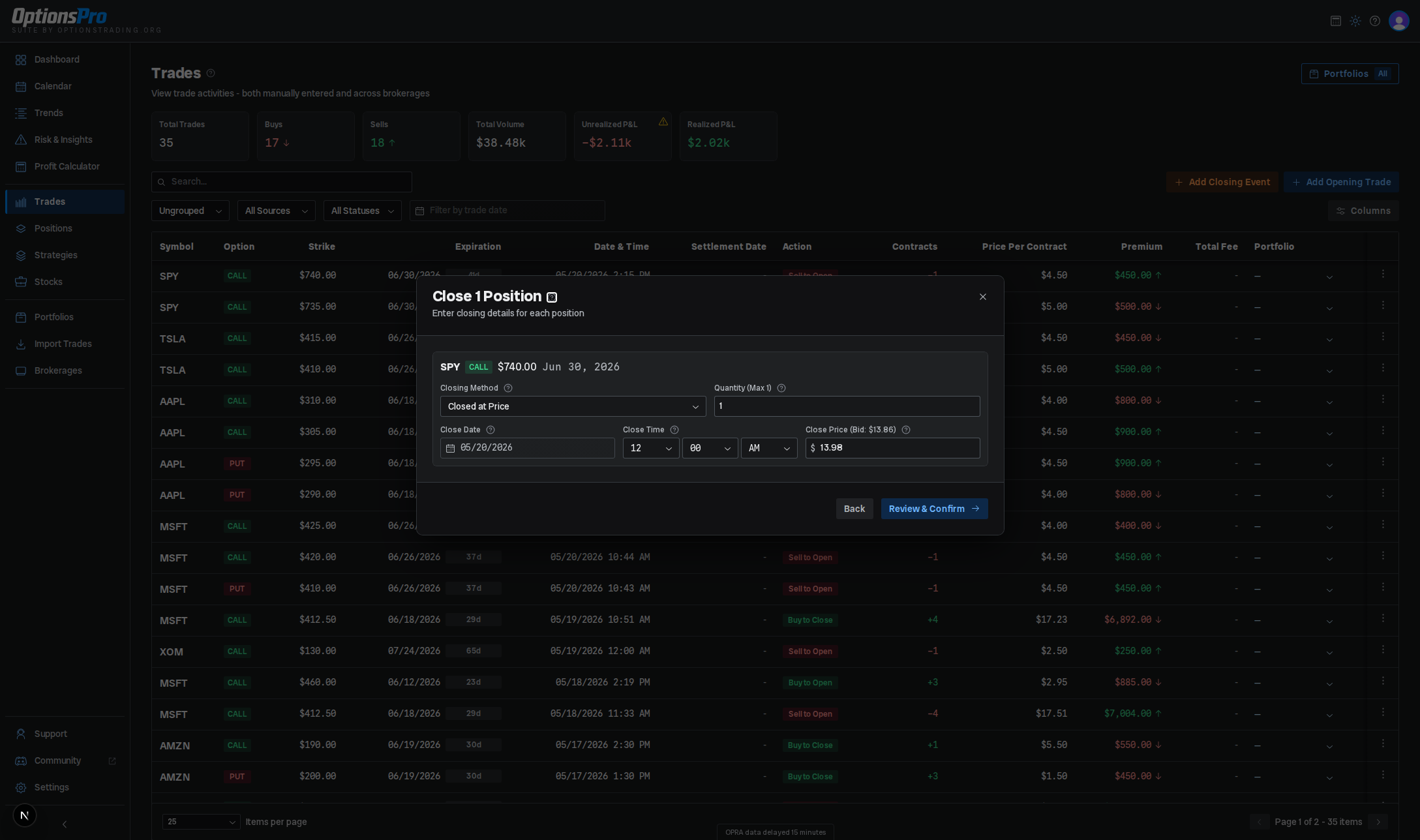
The modal walks through three steps: select, details, and confirm. (Only positions from manual trades are shown - broker-sourced positions close themselves on the next sync.)
-
Select the position(s) you want to close. You can multi-select and toggle between an ungrouped list and a strategy-grouped view.
-
Details - for each position, choose a closing method:
- Closed at Price - record an exit at a specific premium. Defaults to the current market price.
- Expired Worthless - for OTM expirations. Price is fixed at $0.
- Expired ITM - enter the underlying's settlement price; OptionsPro computes intrinsic value as the close price.
Then confirm Quantity (defaults to the full remaining contracts), Close Date (defaults to today, or the expiration date for an already- expired contract), and Close Time.
-
Confirm - review the per-position summary (trade type, premium, and estimated P&L) and submit.
Under the hood, Closed at Price writes a new BTC or STC trade against
your manual position. Expired Worthless and Expired ITM instead
flag the opening trade with closedByExpiration rather than creating a
synthetic closing trade - P&L is still computed against the resulting close
price.
Partial closes
You can close fewer contracts than you opened. The remaining contracts stay open and continue to track unrealized P&L until you close them. There is no "partial" status - the position is simply reported with the leftover net quantity.
Reversing a close
There's no dedicated undo. To reverse a manual close, delete the closing trade from the Trades table's row action menu (Delete Trade); the remaining opener returns to open status on the next read. Trades imported from a broker can't be deleted - you'd need to record a corresponding opening trade to neutralize the close.
Rolling
"Rolling" a position - closing one leg and opening a new one at a different strike or expiration - is modeled as two independent trades. Strategy detection picks up the new opener on its next pass and relinks it into the appropriate structure.
To help decide how to roll, open the Rolling Repair Assistant from a position's Repair row action on the Positions page. It analyzes the live position and returns scored candidate rolls - Roll Out, Roll Up, Roll Down, Roll Out & Up, Roll Out & Down, Roll In, Roll In & Up, and Roll In & Down variants - each with a target strike and expiration, the net credit or debit, the resulting breakeven change, and the Greeks before and after. The assistant is informational only: it doesn't place a roll for you, so you still record the close and the new opening trade yourself using the flow above.